

Redmi phones are coming with many stock apps and many ads. Xiaomi shows many ads in every stock app. Many users are not happy with these apps and ads. Users want to uninstall these apps but they are not able to do it because for uninstalling stock apps you need root access. But every user doesn’t know how to unlock the bootloader, flash the recovery and root the phone because it is a tedious process for them and time-consuming.
So, In this post ill show you how you can remove those stock apps from your Redmi phones without any root access
Step 1: Download this tool and extract its contents. Link: http://bit.ly/2PzSDiz
Step 2: Enable the developer option and enable USB debugging. If the developer option is not enabled then tap 7 times on build number in about phone.
Step 3: Now connect your phone to PC or Laptop.
Step 4: Double click on XiaomiADBFastbootTools and run it.
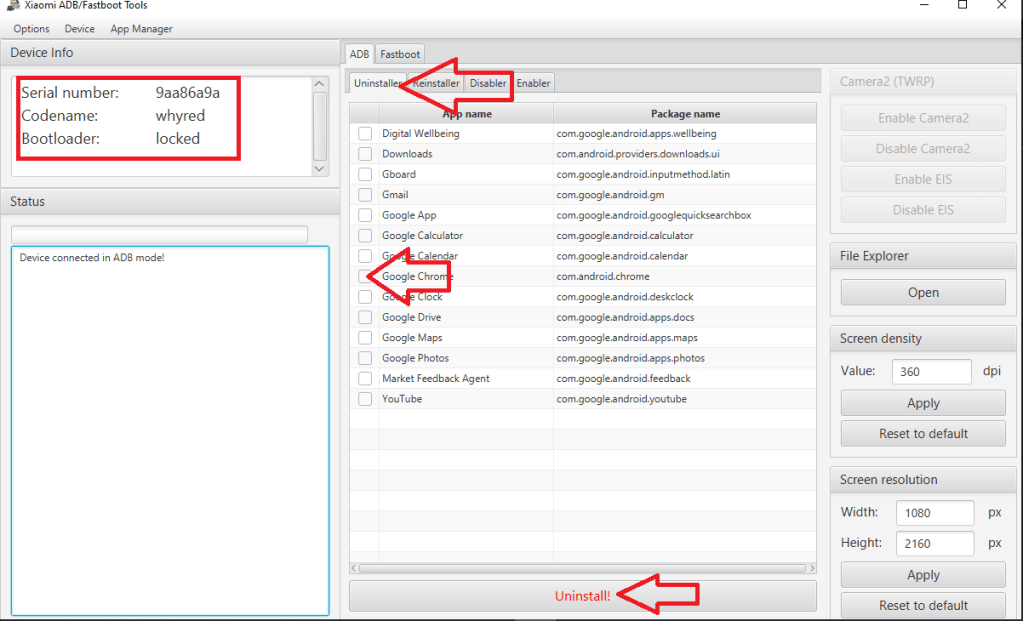
Here, you can see the serial number and codename of the device.
In the center section, you can see there are many tabs available. We want to uninstall the apps so we select Uninstaller. After that, you can see the list of available apps. Select any app that you want to uninstall and then click the Uninstall button.
That’s it. You have successfully removed the app from your phone
 Dhaval's Tech Blogs